Most WooCommerce food ordering plugins stop at the checkout. The order lands in the admin as “Processing”. Somebody prints it and shouts it to the kitchen, and a driver gets the address on WhatsApp. That works at twenty orders a night. At a hundred orders, with two kitchens and five couriers, tickets start getting missed and food arrives cold.
DeliveryCRM is sold on CozyPlugins and built by Sitelia, and it’s designed for that gap. It isn’t another menu or checkout plugin. It takes the orders WooCommerce already collects and adds the ones your operators take by phone. Then it runs all of them through a live board shared by the call desk, the kitchen and the couriers. This review is based on the vendor’s product page, feature list, changelog and requirements for version 1.4.0 (updated 19 September 2026).
Quick verdict
- Best for: restaurants and small chains that deliver with their own couriers, take a lot of orders by phone, and already run WordPress and WooCommerce.
- Not for: single-location venues that rely only on Wolt, Glovo or Bolt Food, or businesses that want hosted software with nothing to maintain.
- Price: €499 (1 site), €999 (5 sites), €1,499 (unlimited). One-off payment with 12 months of support.
- Main strengths: one plugin covers the whole order (phone desk, kitchen display, courier app, customer tracking). Each staff role gets its own screen, the reports measure delivery operations properly, and there’s a REST API with webhooks.
- Main caveats: the product is very new (the first public changelog entry is 1 September 2026), there are no refunds, and several features depend on paid third-party services.
What DeliveryCRM actually is
In the vendor’s words, DeliveryCRM “turns WordPress and WooCommerce into a live dispatch system for restaurants that deliver.” In practice that means four separate front-end interfaces, one for each staff role:
- Operator: the call desk and dispatch board.
- Kitchen: a kitchen display system (KDS) for each restaurant location.
- Courier: a phone-first app for drivers and riders.
- CRM admin: settings, team, zones and reporting.
Staff log in and see only their own screen. They never touch the WordPress dashboard. That matters more than it sounds, because most owners don’t want to give a part-time courier any access to the WordPress backend. A separate team manager screen lets you add staff, restaurants, pickup addresses and delivery zones without going through WordPress Users.
Orders stay WooCommerce orders. The plugin adds its own statuses (Cooking, Ready, In Delivery) on top of the standard ones. It’s also marked compatible with High-Performance Order Storage (HPOS), so it should fit a modern WooCommerce install without workarounds.
How an order moves through the system
1. Operator board and phone orders
The operator board has live columns: New, Cooking, Ready, In Delivery and Done, plus a “Later” column for scheduled orders. Cards update without reloading the page. Each new order starts a five-minute reaction countdown that turns red when time runs out, which is a simple way to stop orders sitting unacknowledged. Ready orders flash and play a sound. Double-click protection stops two operators from grabbing the same order.
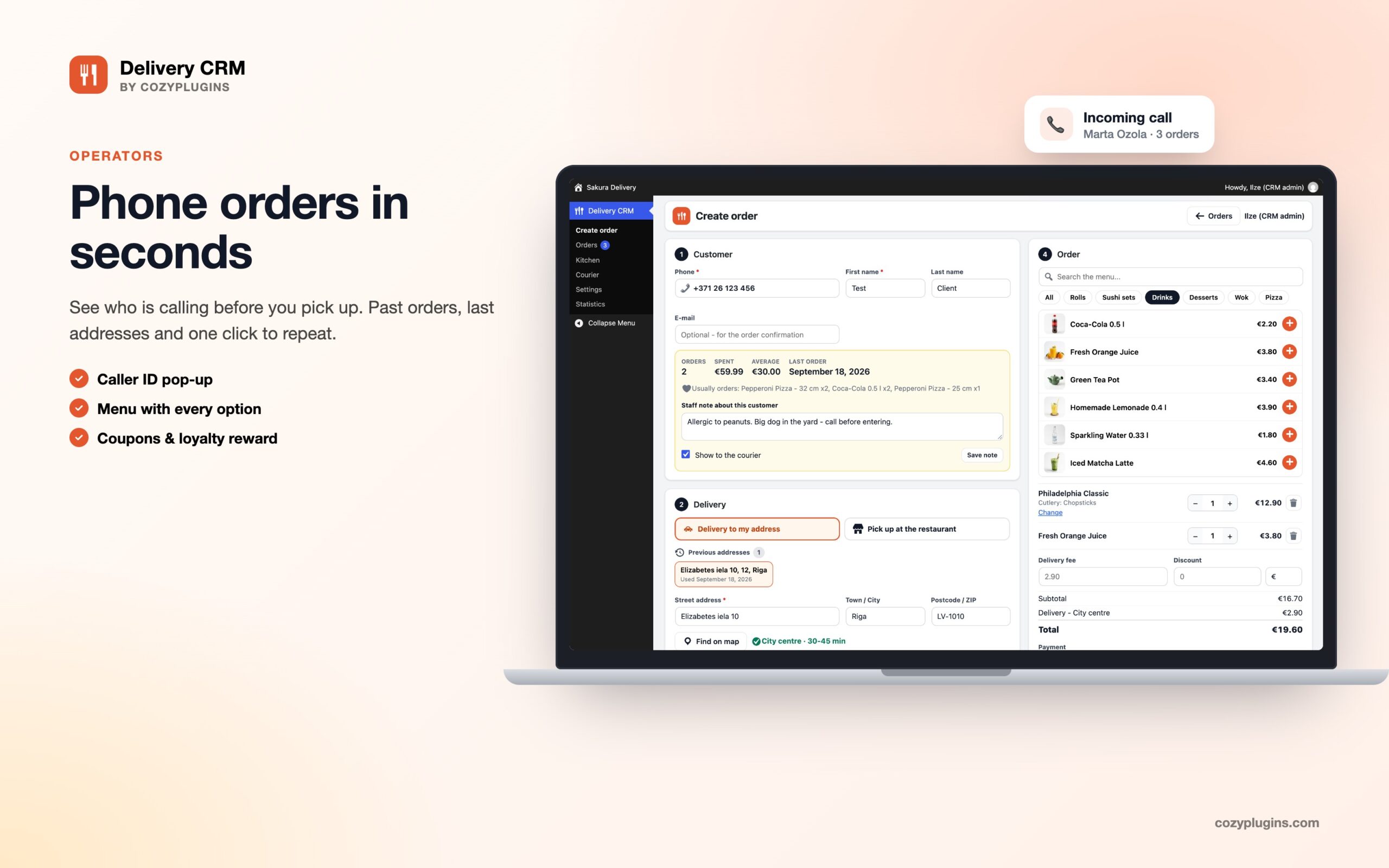
Phone order entry is where DeliveryCRM stands out from a typical WooCommerce add-on:
- Operators can find a customer from as little as three digits of their phone number, then pick from that customer’s last 20 delivery addresses.
- The menu picker has categories and instant search.
- Delivery fees are calculated automatically from the zone and the order total.
- Coupons and loyalty rewards can be applied during the call.
- A customer card shows order history, and a repeat-order button covers the “same as last Friday” calls.
If you connect a phone system, caller ID shows the customer and their past orders before the operator answers. The product page says this works with any phone system that can send a webhook, plus Zadarma and Twilio Voice. Operators who spend the whole shift on the board also get keyboard shortcuts.
2. Kitchen display
Each restaurant location gets its own kitchen login and sees only the orders sent to it. The display uses large type for dish names and options, and gives each order a 15-minute cooking countdown. When the food is done, the cook taps a single “Order is ready” button. Two details stand out for anyone who has worked in a busy kitchen:
- Kitchen stations by product category. The grill station sees grill items, the cold station sees salads, and each dish can be ticked off separately.
- Dark mode for wall-mounted screens, which is easier on the eyes in a hot, bright kitchen.
Kitchens that still want paper can have 80 mm kitchen tickets and bag labels printed automatically.
3. Courier app
The courier interface is built for phones and can be added to the home screen like an app. Couriers receive jobs in real time with the customer’s phone number and a full address, including entrance, door code, floor and apartment. Navigation opens in Google Maps or Waze. A “Delivery confirmed” button records the time and any cash collected.
Beyond the basics, the courier side covers most of what dedicated dispatch software charges extra for:
- GPS tracking, with a live courier map for the operator.
- Proof of delivery by photo, on-screen signature, or both. The files are stored privately, protected by .htaccess on Apache or by nginx rules.
- Failed-delivery reports with reason codes.
- Chat between operator and courier, with push notifications.
- An offline mode for stairwells, basements and rural areas with no signal.
- Cash shift reconciliation: at the end of a shift, the operator confirms how much cash the courier handed over.
4. Customer tracking and notifications
Every order gets a private tracking page showing its status, the estimated arrival time and the courier’s position on a map. Status messages go out automatically by email, Telegram (free), SMS or WhatsApp, and you can edit the message template for each delivery stage. After delivery, customers rate the food and the courier separately out of five stars, and those ratings feed into the reports for each courier and kitchen.
Dispatch automation
Version 1.3 added the features that turn DeliveryCRM from an order board into a dispatcher:
- The system suggests a courier based on who is on shift, how close they are and how many orders they already have. It can also assign couriers automatically if you trust it to.
- Orders can be sent to the nearest open restaurant.
- Couriers can be given several orders at once with an optimised route.
- Managers get alerts when an order is running late.
For busy periods there are two practical controls. A stop-list lets the kitchen mark dishes as sold out. Busy mode either pauses online orders or adds 15 to 60 minutes to the delivery times customers are quoted. Neither feature is glamorous, but both prevent the kind of Friday-night complaints that no report can fix afterwards.
Orders from delivery marketplaces (Wolt, Bolt Food, Glovo) can be entered by hand and are tagged by source in the reports. This is manual entry, not a connection to those platforms.
Reporting
The reports focus on delivery operations rather than generic sales figures. For each order you get four times, each measured against your own targets:
- how long it took to acknowledge the order
- how long it took to cook
- how long it waited for a courier
- how long delivery took
You also get the share of late orders, and breakdowns by kitchen, courier and operator. Heat maps show where orders come from and how long each area takes to serve, which helps when you redraw delivery zones or change fees.
Courier pay can be calculated per delivery, per kilometre or per hour. There are also daily summary emails, weekly shift plans, and revenue and order counts by hour and day. Everything exports to CSV.
Integrations, API and security
- REST API with API keys for POS systems, fiscal printers and accounting software.
- Signed webhooks with retries, so other systems can verify events and catch up on missed ones.
- Server-Sent Events (optional) for instant updates instead of checking for changes every few seconds.
- Push notifications to staff phones without a third-party push service.
- Theme integrations: FoodyPress (delivery zones, price tables, pickup discounts, 1+1 offers) and compatibility with the OnePage Food Delivery theme.
- Two-factor authentication by authenticator app, email code or backup codes.
- GDPR tools that work with WordPress’s built-in personal data export and erase functions.
The interface comes translated into 20 European languages, including English, German, French, Spanish, Italian, Polish, the Nordic and Baltic languages, Ukrainian and Russian. (The product page heading says 18, but its list names 20.)
Requirements and hosting
| Component | Requirement (per vendor) |
|---|---|
| WordPress | 6.0 or newer, tested up to 7.1 |
| WooCommerce | 7.0 or newer, tested up to 11.0 |
| PHP | 7.4 or newer, tested on 8.3; OpenSSL with elliptic curves for push notifications and 2FA |
| Database | MySQL 5.7+ or MariaDB 10.3+ |
| Staff devices | Any current browser; phones for couriers, tablets for kitchens |
| Optional services | Google Maps JavaScript API key (address search), Twilio or Meta WhatsApp Cloud API, Telegram bot (HTTPS required), phone system webhooks |
One hosting detail needs attention. Instant updates keep one PHP worker busy for each open staff screen, about 25 seconds at a time. With an operator board, two kitchen screens and six couriers online, nine workers are tied up on top of your normal shop traffic. Budget shared hosting will struggle with that. The plugin can instead check for new orders at intervals, which works on any host. If you want instant updates, plan for a VPS or a managed WordPress plan with enough PHP workers.
Also budget for running costs outside the licence: Google Maps API usage, SMS and WhatsApp messages through Twilio or Meta, and a phone provider if you want caller ID. Telegram is the only customer channel listed as free.
Pricing
| Licence | Sites | Price | Included |
|---|---|---|---|
| Single Site | 1 | €499 | 12 months support, documentation |
| 5 Sites | 5 | €999 | 12 months support, documentation |
| Unlimited | Unlimited | €1,499 | 12 months support, documentation |
Licences are described as lifetime and released under GPL v2. Support lasts 12 months from purchase. The product page doesn’t say whether updates continue after that, so ask before you buy if it matters to you. CozyPlugins accepts Visa, Mastercard, Amex, Apple Pay, SEPA and Stripe, and sometimes offers discount codes.
For comparison, hosted delivery management platforms for restaurants usually charge a monthly fee per location. A one-off €499 for a single restaurant can pay for itself within the first year, as long as you already have WordPress and someone to maintain it.
What to check before buying
- All sales are final. There’s no refund window, so check your needs before you pay. The changelog mentions a one-click demo setup (sample team and orders) inside the plugin, but the product page doesn’t link to a live demo. Use the contact form to ask the vendor for a walkthrough or screenshots of the screens you care about.
- It’s a new product. Version 1.1 came out on 1 September 2026, 1.3 on 17 September, and 1.4.0 two days later. That pace brings features quickly, but there’s little real-world track record and no customer reviews on the page yet. Test it on a copy of your site before using it on a busy weekend.
- Marketplace orders are manual. If most of your orders come through Wolt, Glovo or Bolt Food, your staff will have to type them in again.
- Hosting matters. See the PHP worker note above.
Pros and cons
| Pros | Cons |
|---|---|
| One plugin covers the whole order: phone desk, kitchen display, courier app and customer tracking | No refunds and no public live demo |
| Staff never see the WordPress admin; four clear roles | Very short track record and frequent releases |
| Real operational metrics (reaction, cooking and delivery times, share of late orders) | Instant updates need decent hosting |
| Proof of delivery, offline mode and cash reconciliation | SMS, WhatsApp and Maps add running costs |
| REST API, signed webhooks, HPOS, 2FA and GDPR tools | Wolt, Glovo and Bolt orders are entered by hand only |
| One-off licence instead of monthly fees per location | Update terms after 12 months aren’t stated |
FAQ
Does DeliveryCRM replace my WooCommerce ordering plugin?
No. It works on top of WooCommerce orders, so you still need a menu and checkout. FoodyPress and OnePage Food Delivery are the themes it explicitly supports. DeliveryCRM handles everything after the order is placed, plus the phone orders your operators enter.
Can it handle several restaurant locations?
Yes. Each restaurant gets its own kitchen login, orders can go to the nearest open location, and reports break down by kitchen. The licence counts WordPress sites, not locations, so several restaurants on one site need only the Single Site licence.
Do couriers need to install an app from the App Store?
No. The courier interface runs in the phone’s browser and can be added to the home screen. It has push notifications and an offline mode.
Does it support pickup orders?
Yes. Pickup orders are marked as handed to the customer instead of being given to a courier. With FoodyPress you can also offer pickup discounts.
Will it run on shared hosting?
Yes, if the plugin checks for new orders at intervals. Instant updates need enough PHP workers to keep one busy for each open staff screen.
Verdict
DeliveryCRM is one of the most complete attempts to turn WooCommerce into a real delivery operation rather than just an online menu. The feature list reads like it was written by someone who has worked a dispatch desk. Reaction timers, door codes, cash handovers, sold-out lists and busy mode are the details that decide whether a delivery night goes smoothly.
Product page: cozyplugins.com/plugins/deliverycrm
Specifications at a glance
| Item | Details |
|---|---|
| Product | DeliveryCRM |
| Developer | Sitelia (sold on CozyPlugins) |
| Version reviewed | 1.4.0, updated 19 September 2026 |
| Platform | WordPress 6.0–7.1, WooCommerce 7.0–11.0, HPOS compatible |
| Roles | CRM admin, Operator, Kitchen, Courier |
| Notification channels | Email, Telegram, SMS, WhatsApp, push notifications to staff |
| Languages | 20 listed |
| Licence | GPL v2, lifetime; 12 months support |
| Price | €499 / €999 / €1,499 |
| Refunds | All sales final |
| File size | 1.4 MB |